Learn how to get special characters, such as the heart, in cricut design space. No uploading needed. Also, no need to download any special software. This is completely free for all windows users. Use this link if you are a MacBook user: Video for MacBook users
Wednesday, March 17, 2021

Easter Card 2021
 Materials used:
- Image is from Miss Kate Cuttables found in cricut design space (free with access membership)
- String is from American Crafts
- Background papers is from SN@P! Color vibe (originally bought on clearance from Hobby Lobby.
Monday, June 15, 2020
How to fix cricut is used by another window error
Friday, April 3, 2020
How to make an easy Easter card


Materials Needed:
Dimensions Used:
- Card was sized down so that was close to 4.25" by 5.5"
Friday, March 6, 2020
Designing shaped cards in Cricut design space

Materials Used:
How to convert the image into an SVG:
Dimensions Used:
- Card opened all of the way: 4.2" by 8.25"
- Card when folded: 4.2" by 4.2"
Friday, February 28, 2020

Friday, February 14, 2020
interactive valentine's day card


Materials used:
- Lawn Fawn Slide on over semi-circle die
- Distress oxide inks: faded jeans, cracked pistachio, and broken china
- make-up brushes bought from the dollar tree
- leaf flourish
- frog image
- Hoppy Valentine's Day image
- Penny
- Foam Tape
- Ek Success Powder Tool
Dimensions Used:
- Card Base: 4.25" by 5.5"
- Card background: 4.25" by 5.5"
Friday, February 7, 2020
How to make a valentine's day shaker card 2020


Materials needed:
- Heart image
- foam tape
- Cricut acetate
- Nicole Love patterned paper from AC Moore (probably not available anymore)
- Art Glitter glue
- Heart Sequins
Dimensions Used:
Card base: 4.25" by 5.5"
Background: 4.25" by 5.5"
Hear cut out: 1.5" by 4.5"
Friday, January 24, 2020
Happy Birthday Candle Card


Materials Needed:
- Recollections Birthday Stampset
- Spectrum Noir Alcohol Markers
- Tim Holtz Stamping Platform (may want to buy a MISTI since this price has significantly increased lately)
- Art Glitter Glue
- Memento Tuxedo Black Ink
Dimensions Used:
- Card Base: 4.25" by 5.5"
- Blue Mat: 4" by 5.25"
- White Mat: 3.75" by 5"
Friday, January 17, 2020
How to make a butterfly pop up card


Materials needed:
- Art Glitter Glue
- Card stock color of your choice
- Glitter card stock (optional)
- Project link to design space
Dimensions Used:
- Card base is 5" by 7"
- Butterfly is 3" by 1.8"
- Happy Birthday is 4" by 2.5"
Friday, January 10, 2020
Thank you card for Christmas 2020

Materials Used:
- Acrylic Paint: Reds, metallic gold and greens (bought from Walmart)
- Snow flake confetti
- Letter IT thank you stamp
- Recollections card stock was used
Dimensions Used:
Card Base: 4.25" by 5.5"
Green Mat: 4" by 5.25"
White Mat: 3.75" by 5"
White Rectangle: 4" by 2.5"
Friday, December 20, 2019
Dollar Store Oven Mitt


Materials Used:
- We whisk you a Merry Christmas and Baking Spirits Bright Images
- Baking Christmas Cheer
- Tis the season for baking cookies image
- Many have eaten here, few have died
- Believe
- Made with love which means I licked the spoon (FREE)
- Oven Mitt bought from the Dollar Tree
- Siser easy weed vinyl was used
- Cricut Easy press 2 was used. I would recommend using the Cricut easy press 2 mini.
Friday, December 13, 2019
How to make a Santa place-mat for Christmas

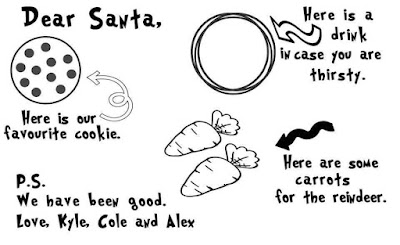
Image Used:

Materials:
- Cricut Easy Press 2
- Siser Easy Weed in white
Dimensions used:
- 15.5" by 11"
Friday, December 6, 2019
How to personalize a stuffed animal

Materials Needed:
- Elf from the Dollar Tree
- HTV or iron on (I recommend siser easy weed or cricut everyday iron on)
- Hair Straightener
Dimensions used:
- Name: 2" by 1"
- Snowflake: 1.8" by 1.8"
- Year: 1" by 0.5"
Friday, November 22, 2019
Thanksgiving card 2019


Materials Used:
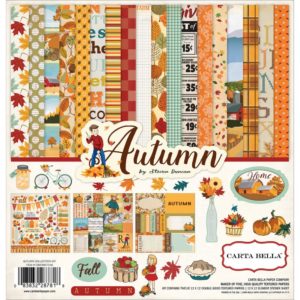
- Autumn Paper Pack by Steven Duncan from Carta Bella (currently unavailable, so this is what I would recommend)
- Turkey is from Create a Critter in Cricut design space
- Cut Align Ruler
- Tim Holtz Stamping Platform
- Distress Ink Vintage Photo
- Mini Messages from Cardz TV stamps
Dimensions Used:
- Card Base: 4.25" by 5.5"
- Dark Brown Mat: 4" by 5.25"
- Printed Mat: 3.75" by 5"
- Turkey: 2.1" by 2.7"
- Scalloped oval frame: 3" by 4"
Here is a link to the project in Cricut Design Space if you would like to re-create this project: https://design.cricut.com/#/design/183574826
Friday, November 15, 2019
How to create a mermaid birthday card


Materials Used:
- Mermaid Image
- Waves Image
- Cloud Border
- Stencil material
- Distress Oxide Ink: peacock feathers, broken china, and faded blue jeans
- Make-up brushes
- Chloe font used in cricut design space
Dimensions Used:
- Card Base: 4.25" by 5.5"
- Dark Blue mat: 4" by 5.25"
- Sky background: 3.75" by 5"
Friday, November 8, 2019
How to offset text in inkscape the easy way

Materials Needed:
- Inkscape
- Font of your choice from dafont
- A labtop or PC computer of your choice. I love my Microsoft Pro 4, so I would recommend a Microsoft Pro 7.
- Cricut Design Space
Friday, November 1, 2019
How to size and center the front and back of a tshirt

Materials Used:
- Dwight Schrute head
- Bernard MT Condensed font used for the bears, beat, battle star Galatia
- Dunder Mifflin logo used on the back of the t-shirt (for personal use only)
- Cricut everday vinyl white was used. I also recommend siser vinyl.
- Blue shirt was bought from Michaels craft store
- Cricut easy press 2
Dimensions used:
Follow the sizing in the chart above.
I used a medium adult t-shirt.
- Dwight front of shirt was 5.5" by 9.7"
- Dunder Mifflin logo was 10" by 4.7"
Friday, October 25, 2019
Price is right costume tutorial


Materials Needed:
- Price is right logo
- Name tag for the price is right
- Yard Sale Marker font by DJB Fonts
- Parchment paper
- Cricut easy press 2 or a heat press
- t-shirts
- vinyl: yellow, black and red (I recommend Cricut vinyl or Siser easyweed)
Dimensions Used:
- Price is right logo: 6.9" by 6.3"
- Name Tag: 7.7" by 4.7"


Friday, October 18, 2019
Halloween bat card 2019


Materials Used:
- Bat Image
- Vintage Halloween scrapbook paper (limited supplies online, but can buy in store from AC Moore)
- Recollections Halloween Stamp Sentiment for inside the card (act now, limited quantities available)
- EEK sentiment (currently unavailable, but I recommend this other stamp set)
- Bat Stamps (currently unavailable, but I recommend this other stamp set)
- Tim Holtz Stamping Platform
- Cut Align Ruler
- Art glitter glue
Dimensions used:
Card Base: 4.25" by 5.5"
Black Mat: 4" by 5.25"
Bat Mat: 3.75" by 5"
Subscribe to:
Posts (Atom)
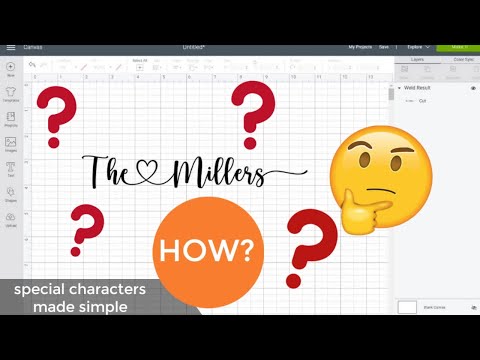
How to get special characters using a windows computer
Learn how to get special characters, such as the heart, in cricut design space. No uploading needed. Also, no need to download any special s...
-
I made this card for my senior students that I teach. Our school mascot is a bear, so I felt like the teddy bear parade cart...
-
Materials used: 2019 image graduation hat image The tassel is worth the hassle image - found in cricut design space (Gra...
-
Materials needed: Deco Foil Transfer Gel Tim Holtz Doily stencil Darcie Flower embossing folder Miss Katecuttables flow...
-
In addition to mother's day cards, I think that aunts are pretty spectacular and also need celebrated. Materials ne...
-
The inspiration for this card came from Janis Lewis who has a blogspot at pausedreamenjoy.blogspot.com . Check out her site for...
-
Learn how to get special characters, such as the heart, in cricut design space. No uploading needed. Also, no need to download any special s...


